How to Locate Your DBL Friend Code
Finding your Dragon Ball Legends friend code is essential for generating QR codes and connecting with other players. Whether you want to share your code with friends or create QR codes for daily rewards, this guide will show you exactly where to find it.
Quick Guide: Finding Your Friend Code
Step 1: Open Dragon Ball Legends
Launch the Dragon Ball Legends app on your mobile device. Make sure you're logged into your account before proceeding to the next step.
Step 2: Navigate to the Menu
From the main screen, tap on the menu button. This is usually located in the corner of your screen and opens up the main navigation menu with various game options.
Step 3: Tap on "Friend"
In the menu, look for the "Friend" option and tap on it. This will take you to the friend management section where you can view your friend list and access your profile information.
Step 4: Tap on Profile Info
Once you're in the Friend section, locate and tap on "Profile Info". This is where your personal player information is displayed.
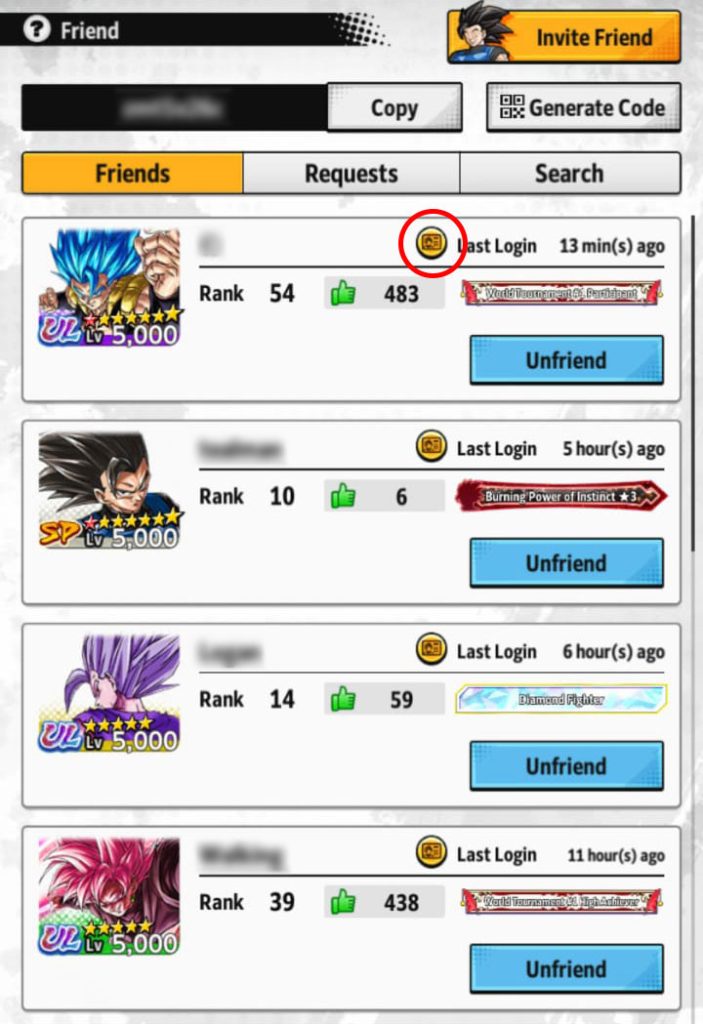
Tap on "Profile Info" in the Friend section
Step 5: Copy Your Friend Code
Your 8-character friend code will be displayed prominently on your profile page. This alphanumeric code is unique to your account. Tap on it or use the copy button to copy it to your clipboard.
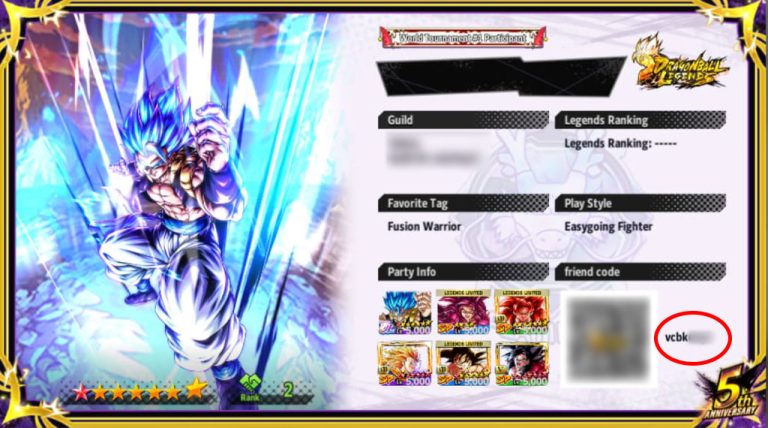
Your friend code is displayed here - copy it to share or generate QR codes
What to Do with Your Friend Code
Now that you have your friend code, you can:
- Generate QR codes using our free DBL QR code generator to share with friends
- Share it with the community in our Make Friends section to connect with other players
- Earn daily rewards by having others scan your QR code for chrono crystals
- Collect dragon balls to summon Shenron or Porunga for special rewards
Ready to Generate Your QR Code?
Use your friend code to create DBL QR codes instantly with our free generator!
Pro Tips
Keep Your Code Safe
Your friend code is permanent and unique to your account. Save it somewhere safe so you can easily share it whenever needed.
Share Regularly
Share your friend code on social media, Discord servers, or our community to maximize your daily rewards from QR code scans.
Generate Multiple QR Codes
You can generate up to 3 QR codes at once using our generator. Use your own code plus two friends' codes to maximize efficiency!
Frequently Asked Questions
Can my friend code change?
No, your friend code is permanent and will never change. Once you have it, you can use it indefinitely to generate QR codes.
What if I can't find the Friend menu?
Make sure your game is updated to the latest version. The Friend feature should be accessible from the main menu. If you still can't find it, try restarting the app.
How many characters is a friend code?
All DBL friend codes are exactly 8 alphanumeric characters (a mix of letters and numbers). If your code is a different length, double-check that you've copied it correctly.